









Deep Code for AI Productivity
- Free
- 4
- V1.6.8
Free Download for Windows
View an ad to download for free

- DeepCode
Use DeepSeek V4 on Claude Code - zero setup, no usage limits and BYOK supported
Deep Code — DeepSeek V4, Now Inside Claude Code
Imagine Claude Code's familiar interface, powered by DeepSeek V4's next-level reasoning — at a price that actually makes sense for daily use. That's Deep Code.
We built it for everyone who lives in code, design, lesson plans, research papers, or server logs. Whether you're a student debugging your first app, a designer prototyping interactions, or a sysadmin automating infrastructure, Deep Code removes the friction between you and powerful AI.
Why Choose Deep Code?
Seriously Cheaper — Deep Code runs on DeepSeek V4 Pro. You get the same elite coding intelligence the big names charge premium prices for — except your bill stays a fraction of the size. Bring your own API key and pay only for what you use.
Zero Terminal Hassle — No command-line gymnastics. Deep Code auto-installs and launches Claude Code for you. Double-click the app, and you're talking to DeepSeek V4 in seconds.
Your Workflow, Supercharged
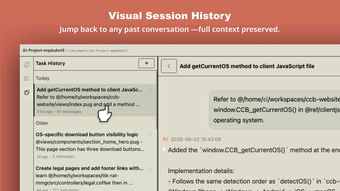
Visual Session History — Every conversation lives in a clean, split-pane browser. Jump back to yesterday's coding session or last month's architecture review with one click. Context is never lost.
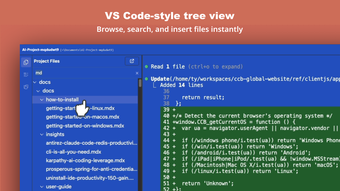
VS Code-Style File Explorer — Browse your project tree, double-click any file, and an @ reference drops straight into your chat. No memorizing paths. No tab-switching. Just point and ask.
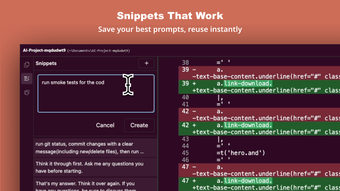
Snippets That Work Save your best prompts — the ones that nail code reviews, generate test cases, or summarize research. Double-click to drop them into any conversation. Build your personal playbook over time.
Speak Your Mind — Hit record and talk naturally for up to five minutes. Our context-aware AI cleans up your speech into structured, actionable prompts. Great for thinking out loud while walking or when typing feels slow.
Built for How You Actually Work
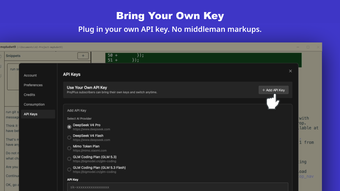
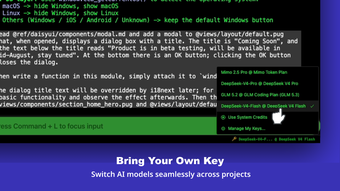
BYOK Freedom — Plug in your own DeepSeek API key. No middleman markups.
Model Switching — Hop between AI models across different projects without reconfiguring anything.
WYSIWYG Session Panel — See your full Claude Code session history rendered cleanly, not buried in terminal scrollback.
One-Click @-References — Reference files, functions, or folders instantly without typing paths.
Prompt Library — Save, organize, and reuse your most effective prompts forever.
Loading…
App specs
Developer
- DeepCode
License
Free
Version
1.6.8
Latest update
Platform
Windows
OS
Windows 11
Language
English
Available languages
- Spanish
- English
- French
- German
- Italian
- Portuguese
- Russian
- Polish
- Chinese
- Turkish
- Korean
- Japanese
- Czech
- Danish
Size
158.01 MB
Program available in other languages
Deep Code for PC
- Free
- 4
- V1.6.8
Free Download for PC
View an ad to download for free
User reviews about Deep Code
Have you tried Deep Code? Be the first to leave your opinion!
Add reviewTop downloads AI Productivity for Windows
Top downloads AI Productivity for Windows
Top downloads AI Productivity for Windows
Related topics about Deep Code
Latest articles

Apple now faces £2 billion UK lawsuit over ATT: iOS developers claim “double consent” burden

Google WeatherNext 3 is here: faster forecasts and better rain prediction

Sony’s GTA 6 DualSense controllers launch November 19: two Vice City designs

Daba: Land of Water Scar returns at State of Play: PS5 window set for spring 2027

Until Dawn 2 is still not official: Sony has not confirmed the sequel
Laws concerning the use of this software vary from country to country. We do not encourage or condone the use of this program if it is in violation of these laws. Softonic may receive a referral fee if you click or buy any of the products featured here.